- How often does BCB sync data from my integration?
By default, data syncs daily at 00:00 UTC - Can I change the sync frequency?
Yes! In the Integration Centre, go to your desire integration's sync settings. Here you can change the Sync Frequency, and if you have selected Daily, the Daily Sync Time (UTC). The Daily default sync time is 00:00UTC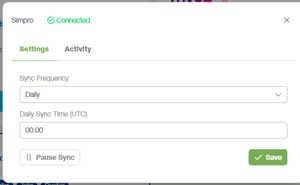
- Can I manually sync my data?
Yes! Simply click ‘Sync Now’ on the desired integration
- How long does a sync take?
Most syncs complete within a few minutes, depending on the data size and system load
- Why is my sync taking a long time?
First time syncs, or large datasets may take longer to process. If a sync fails, you can try sync again. If it is doing this repeatedly, you can try disconnecting and reconnecting the integration and see if this fixes it. Otherwise fill out the following Support Request Form
- What does 'sync failed' mean?
Sync failed means your sync was not successful. Try a manual sync to see if this works.
- What data is pulled into BCB?
SIMPRO’s contacts, categories, jobs and quotes, and XERO and MYOB data regarding contacts, accounts, categories and transactions are pulled into BCB. This is required for cash flow forecasting, reporting and scenario modelling.
- Does BCB store historical data?
Yes. Historical data is stored and used to support forecasting and trend analysis
- Why is my data not appearing after a sync?
Sync delays or connection issues may prevent your data from appearing. Go to the Integration Centre, check your integration is properly connected, and attempt a manual sync. Wait a couple minutes and check again. If it still does not appear, fill out the following Support Request Form
- Does BCB update in real time?
BCB updates based on your sync schedule rather than live, ensuring stable and reliable data.
English - Australia