- What systems does BCB integrate with?
BCB integrates with XERO, MYOB and SIMPRO
You are able to connect to these through the onboarding setup, or through the integration centre
- How do I connect with each of these platforms?
Go to the Integration Centre, find the desired platform and click ‘Connect’. You are then able to connect through following a simple step-by-step process. If you require further support, there are individual instructions for each platform you can access. - I just synced for the first time, why can't I see all my data?
BCB syncs a smaller amount of data in the initial sync and continues to sync in the background once onboarding has completed. This lets you get started with BCB’s tools without having to wait for all your data come across first. If you still feel as if data is missing, click ‘Sync Now’ in the integration centre to perform a manual sync.
- Can I connect multiple systems/integrations at once?
Yes! You can connect multiples systems (E.g. Xero and Simpro) at once. The aim of BCB is to allow you to combine your data from your financial, and job management systems so you can visualise it in real time.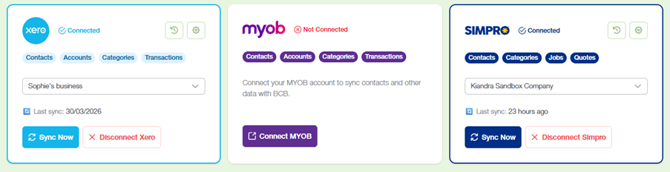
- Can I switch connected organisations?
Yes! You can disconnect an integration and reconnect it to another organisation at any time, but only one organisation can be linked per integration at a time - What permissions do I need to connect my system?
You will require administrative or authorised access permissions within the system you are trying to connect to. - What happens if my connection fails?
Sometimes an integration will not connect properly, simply click ‘Reconnect Xero’ and it will try again. You can also try disconnecting and then reconnecting the integration. If it still does not work, please fill out the Support Request Form for assistance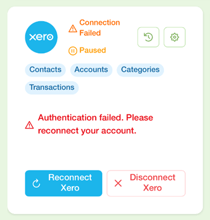
- What’s the best way to set up BCB for accurate forecasts?
Forecast accuracy depends on the quality of your data, consistency of syncing, and correct setup of categories and payment terms - How can I improve forecast accuracy?
Regularly sync data, keep categories up to date, maintain consistent payment terms, use scenarios to test assumptions before they affect your cashflow - What happens if my accounting data changes after a sync?
Changes will flow through on the next sync and update your forecasts accordingly. You are also able to click ‘Sync now’ in the integration centre to trigger a manual sync.
English - Australia